SASSA Status Check – SRD R370 Status and Pay Date
See if your month is approved, when your R370 is paid, and what to do if your result says pending or declined.
You need your 13-digit ID number and the phone number you applied with. Checking is free.
A SASSA status check shows whether your SRD R370 grant is approved, pending or declined for each month, when SASSA will pay you, and why a month was declined. Here is how to check on every official channel and what each result means.
Go to srd.sassa.gov.za, open the status section, enter your 13-digit South African ID number and the cellphone number you used to apply, then tap Submit. Your result shows each month as approved, pending or declined, plus your payment date once SASSA sets it.
This website is not affiliated with SASSA. We do not take applications or make payments. Always confirm your status through the official channels listed below.
What Is the SRD R370 Grant?
The Social Relief of Distress (SRD) grant is a temporary social grant paid monthly to adults who have no job and little or no income. It started in May 2020 at R350 during the COVID-19 lockdown and went up to R370 in April 2024. Many people still call it the R350 grant, but it is the same grant on the same SRD portal.
- Amount: R370 a month, unchanged since April 2024.
- Funded until: 31 March 2027, after Treasury set aside R36.4 billion in the February 2026 Budget.
- After March 2027: in November the agency said the SASSA SRD grant is set to continue until 31 March 2028, once the formal processes are finished.
- Reapplying: not needed if your SRD application is still active.
Who Qualifies for the Grant?
- You are between 18 and 60 years old.
- You are a citizen, permanent resident, refugee or registered asylum seeker living in South Africa.
- Your income is below R624 a month. This is the means test.
- You do not get UIF, NSFAS funding or another grant for yourself. A Child Support Grant you collect for a child does not count against you.
- You do not live in a state-funded institution.
SASSA runs the means test again every month. That is why one month can be approved and the next declined, even when nothing in your life has changed. If you have not applied yet, follow our easy steps for applying for the SRD R370 grant.
What You Need Before an SRD SASSA Status Check
- Your South African ID number, or the file number on your refugee or asylum permit.
- The phone number you used on your SRD grant application.
- Data or Wi-Fi for the website and WhatsApp. A basic phone works for USSD.
Your ID and phone number must match what SASSA has on file. If you changed your number, update your SRD phone number first or the check will fail. The same applies to your personal details, such as the spelling of your name.
Official Ways to Check Your SASSA SRD Status
There are five official channels for status checks. They all read from the same SASSA system, so if one is down, try the next. You can also run a SASSA SRD status check online at any hour, even on weekends.
| Method | What you use | Best for |
|---|---|---|
| Website | srd.sassa.gov.za | Full results and payment dates |
| 082 046 8553 | Quick checks on your phone | |
| USSD | *134*7737# | No data or no smartphone |
| Phone call | 0800 60 10 11 | Explaining a decline or appeal |
| SASSA office | Your nearest local office | Identity and banking problems |
SRD website
The official SASSA SRD website gives the most detail: every month you applied for, the reason for any decline and your payment date.
Steps
- Type srd.sassa.gov.za into your browser yourself. Do not tap links sent by SMS or posted on Facebook.
- Scroll down and open the status check page. Some older pages still call it “Application Status”.
- Enter your ID number and cellphone number in the status check form.
- Tap Submit and read the result for each month.
Keep in mind
- The sassa status check tool gets slow between about the 18th and the 26th of each month.
- Early morning or late at night usually works better.
- If the page will not load, wait 30 minutes before trying again.
082 046 8553
A quick way to check on your phone, and it works on Wi-Fi when you have no data.
Steps
- Save 082 046 8553 as a contact.
- Open WhatsApp and send “Hi”.
- Type your ID number when asked. A PIN goes to your registered number.
- Choose the SRD option to see your SASSA SRD R370 grant status and, in most cases, your payment date.
Keep in mind
- Fake numbers are shared on social media.
- Confirm the number on the official SASSA website (sassa.gov.za) before you save it.
USSD code
*134*7737#
Works on any cellphone, including basic phones, and needs no data.
Steps
- Dial *134*7737# from the phone number linked to your application.
- Follow the menu and choose the status option.
- Read your result on screen.
Keep in mind
- During 2026 some users got a “service code not supported” message on certain networks.
- If that happens, wait 15 minutes and try again, or switch to WhatsApp.
Toll-free line
0800 60 10 11
Call the SASSA toll-free line when you need a person to explain your result.
Steps
- Call 0800 60 10 11, Monday to Friday from 08:00 to 16:00.
- Give the agent your ID number.
- Ask them to check the status of your SASSA application, explain a decline code or help with an appeal.
Keep in mind
- Keep your ID number ready before you call.
- Expect a longer wait near month-end.
SASSA office
Mon to Fri, 08:00 to 16:00
Go in person when the other channels cannot solve your problem.
Steps
- Take your original ID or permit.
- Arrive early, because queues build up fast.
- Explain your problem and ask for a reference number.
Keep in mind
- Best when your identity check failed.
- Best when you lost the SIM card linked to your file.
- Best when nothing else has worked.
What Does Your SRD Status Mean?
When checking your SASSA result, look at each month on its own, because each month has its own result. Here is what each one means and what to do next.
Pending
Pending means SASSA is still verifying your details for that month. Every month your ID number is checked against bank, SARS, UIF, NSFAS and Home Affairs records, and pending means those checks are not finished yet.
Why this happens
- The monthly means test has not finished running.
- You applied recently and your first check is still in the queue.
- You changed your phone number or bank details and SASSA is checking the new details.
What to do
- Check again in 7 to 10 days.
- Do not submit a new application. A second application can slow your file down.
- If you are still pending after a month, call 0800 60 10 11.
Approved
You passed the means test for that month and SASSA will pay you. The payment date often appears a few days after the approval.
Why this happens
- Your income for that month was below R624.
- Your ID, phone number and other records all matched.
What to do
- Check that your bank details are confirmed, so the money has somewhere to go.
- Watch for an SMS from SASSA.
- Check your status again to see your payment date once it appears.
Approved with a payment date
Your money is set for the date shown next to that month.
Why this happens
- SASSA has added you to that month’s payment list.
What to do
- Bank account: allow two to three working days for the money to show.
- Cash send or retail pay point: wait for the SMS with your collection details, then collect with your ID.
- Nothing after seven working days? Contact SASSA with your ID and the month.
Declined
You failed one or more checks for that month. The reason is shown next to the month on your result.
Why this happens
- Money of R624 or more came into your bank account, including money from family.
- Your ID appears on the UIF, NSFAS or government payroll databases.
- You already receive another SASSA grant for yourself.
What to do
- Read the decline reason carefully.
- If it is wrong, collect proof such as bank statements for that month.
- Appeal within 90 days. Each declined month needs its own appeal.
- Keep checking: you are tested again every month, so a later month can still be approved.
Referred
Your file has been sent to a SASSA staff member to check before SASSA makes a decision. This can happen when your details do not match across databases, or when the system suspects fraud.
Why this happens
- Your ID number may have been used on another application.
- Your details differ between SASSA and other government records.
What to do
- Wait up to 30 days for the review to finish.
- Do not reapply while your file is referred.
- If nothing changes, call 0800 60 10 11 or visit an office with your ID.
Identity verification failed
The details on your application do not match Home Affairs records, so SASSA cannot confirm who you are.
Why this happens
- Your name or ID number was typed incorrectly.
- Your Home Affairs record has an error or a block on it.
What to do
- Check your details against your ID document.
- Fix any problem with Home Affairs first.
- Visit a SASSA office with your original ID, or complete the identity check if SASSA sends you a link by SMS.
Bank details pending
SASSA has not yet checked the bank account you gave, so it cannot send your money.
Why this happens
- The account is not in your own name.
- The account number has a typo, or the account is closed.
What to do
- Update your bank details on srd.sassa.gov.za using the secure link sent to your phone.
- Use an account in your own name.
- Allow a few days for the bank to confirm it.
Reapplication pending
Your application needs to be submitted again before SASSA can test you for new months.
Why this happens
- Your application lapsed or SASSA asked applicants to confirm their details again.
What to do
- Go to srd.sassa.gov.za and submit your application again.
- Check your status the following month to confirm it went through.
Cancelled
Your application was stopped, either at your request or by SASSA.
Why this happens
- You found work or started receiving another grant.
- SASSA found a problem with your application.
What to do
- Contact SASSA to find out why.
- If the cancellation is wrong, ask what you need to do to fix it.
- If your situation has changed, you can apply again.
Common SASSA SRD Decline Reasons
When a month says Declined, the reason appears next to it. These are the reasons you are most likely to see, and what each one means:
- Alternative income source identified: R624 or more came into your bank account that month. Money from family can trigger this.
- UIF registered: your ID appears on the UIF database.
- NSFAS registered: you are listed for student funding.
- Existing SASSA grant: you already get another grant for yourself.
- Age outside range: your ID shows you are under 18, or 60 or older.
- Identity verification failed: your details do not match Home Affairs.
- Gov payroll registered: you are listed as a government employee.
If the reason is wrong, appeal. Bank statements for that month are the best proof you can give.
SASSA SRD R370 Payment Dates 2026
Next SRD payment
23 and 25 November
Monday and Wednesday, confirmed by SASSA
- Amount
- R370 a month
- Income limit
- Below R624
- Funded until
- 31 March 2027
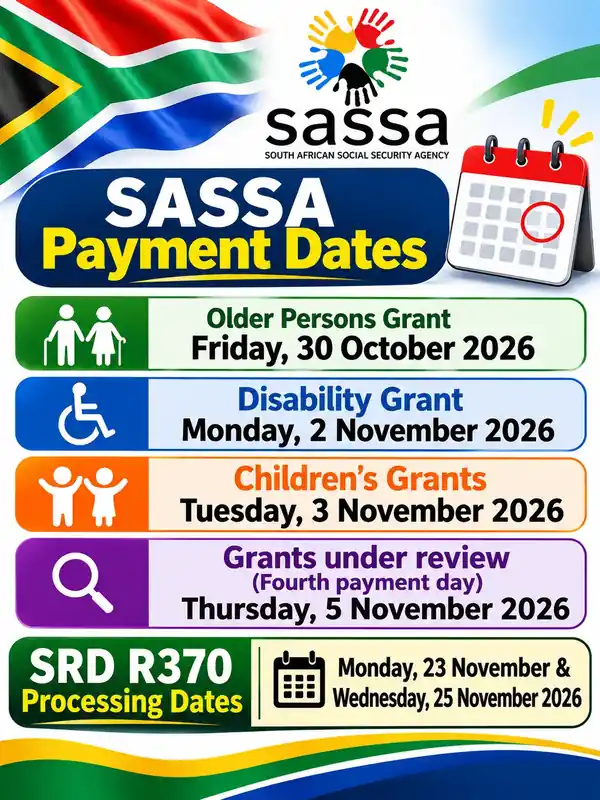
The SRD grant is paid in groups near the end of each month, not on one fixed day. Your own date only shows after approval. This table lists the payment windows reported for each month this year.
| Month | SRD payment window | Status |
|---|---|---|
| January | 23 to 28 January | Paid |
| February | 20 to 25 February | Paid |
| March | No single window announced | Paid |
| April | 23 to 24 and 29 to 30 April | Paid |
| May | 21 to 22 and 27 to 28 May | Paid |
| June | 24 to 25 June | Paid |
| July | 23 to 24 July | Paid |
| August | 24 to 26 August | Paid |
| September | 23 and 25 September | Paid |
| October | 22 and 23 October | Paid |
| November | Monday 23 and Wednesday 25 November | Confirmed by SASSA |
| December | Not announced yet | Check your status |
Your exact day can fall outside these windows. A sassa status check for R370 payment information is the only way to see the date that applies to you.
Payment Dates for Other SASSA Social Grants
Older Persons, Disability and Children’s grants are paid at the start of each month. The November dates moved forward because of the 4 November local government elections.
| Month | Older Persons | Disability | Children’s |
|---|---|---|---|
| November | Fri 30 Oct | Mon 2 Nov | Tue 3 Nov |
| December | Wed 2 Dec | Thu 3 Dec | Fri 4 Dec |
| January 2027 | 5 Jan | 6 Jan | 7 Jan |
| February 2027 | 2 Feb | 3 Feb | 4 Feb |
| March 2027 | 2 Mar | 3 Mar | 4 Mar |
Your money stays in your account after your date, so there is no need to queue on the first day.
SASSA Grant Amounts
| Grant | Monthly amount |
|---|---|
| SRD | R370 |
| Older Persons (60 to 74) | R2,400 |
| Older Persons (75 and older) | R2,420 |
| Disability Grant | R2,400 |
| Care Dependency | R2,400 |
| War Veterans | R2,420 |
| Foster Child | R1,290 |
| Child Support | R580 |
| Grant-in-Aid | R580 |
Amounts for permanent grants change each April with the national Budget. Check sassa.gov.za for the latest figures.
Approved but No Money?
Many people get an approved month with no money. Start with a SASSA payment status check on srd.sassa.gov.za, then check these points:
- Has the payment date passed? Banks can take two to three working days to show the money.
- Does your result say “Bank details pending”? Your account has not been confirmed yet.
- Is the bank account in your own name? SASSA rejects accounts that belong to family or friends.
- Did you choose a retail pay point or cash send? Look for the SMS with your collection details.
If seven working days pass after your date and nothing has arrived, contact SASSA with your ID and the month you are asking about. Read the seven reasons you can be approved but not paid.
How to Change Your Bank Details or Payment Method
You can change how you get paid only on srd.sassa.gov.za. Nobody else can do it for you.
- Go to srd.sassa.gov.za and open the banking details section.
- Enter your ID; SASSA sends a secure link to your registered phone.
- Open the link and enter your new account details.
- Submit, then allow a few days for the bank to confirm the account.
Never hand your bank details, PIN or OTP to anyone who calls or messages you. SASSA staff will never ask for them. For screenshots of each step and the payment options, read how to change your SASSA banking details.
How to Submit a SASSA Status Check Appeal
If a month was declined, you have 90 days to appeal. Each declined month needs its own appeal, or that decision stands.
- Go to srd.sassa.gov.za/appeals, the official appeals page. Appeals are decided by the Independent Tribunal for Social Assistance Appeals (ITSAA).
- Enter your ID and the phone number linked to your application, then confirm the OTP.
- Choose the month and the reason you disagree with the decision.
- Submit and keep your reference.
After you apply
- The Independent Tribunal for Social Assistance Appeals reviews each case.
- A decision can take up to 90 days.
- You can track progress on the same appeals site.
- A sassa status check appeal cannot be submitted from the normal status page.
For proof that helps and a list of decline reasons, read how to appeal a declined SRD month.
Tips to Avoid Problems and Scams
- Look up your SASSA status regularly, at least once a month, so you spot a decline in time to appeal.
- Keep the same phone number. If it changes, update it on the SASSA SRD portal before your next check.
- Only use official SASSA links. Real web addresses end in sassa.gov.za or dsd.gov.za.
- Ignore anyone asking for an “admin fee” or “reactivation fee”. Checking, applying and appealing are free.
- Do not share your OTP with anyone who says they work for SASSA or the South African Post Office.
SASSA Contact Details
Frequently Asked Questions
How do I check my status with my ID number?
Visit srd.sassa.gov.za, enter your ID and phone number, and tap Submit. You can also use WhatsApp, USSD or the toll-free line.
What does pending mean?
Pending tells you the checks for that month are not finished yet. Check again in about a week. Do not submit a new application.
Do I need to reapply every month?
No. Your application stays active and SASSA checks you again every month. You only apply again if your result says “Reapplication pending” or your file was cancelled.
Can I check status without data?
Yes. Dial *134*7737# from your registered number, or call 0800 60 10 11.
Is the grant ending in 2027?
Not for now. Funding runs to 31 March 2027, and SASSA has said it will continue to 31 March 2028 once formal processes are complete.
How long does an appeal take?
Up to 90 days. Track it on srd.sassa.gov.za/appeals.
Keep Your Grant on Track
Check once a month, keep your phone number and bank details current, and use only official SASSA channels: the SRD portal, WhatsApp, USSD or the toll-free line. If a month is declined and the reason is wrong, appeal within 90 days with proof.
Last updated 15 November 2026. Dates and amounts are checked against SASSA, DSD and National Treasury announcements.